The Integrated Grievance Redressal System of Andhra Pradesh, commonly known as IGRS AP, is an official online portal launched by the state government to simplify property-related services. This digital initiative aims to provide a transparent and efficient platform for citizens to manage their property records without the need for multiple visits to government offices.
The portal serves as a central hub for a wide array of services, including property registration, the search and download of Encumbrance Certificates (EC), assessment of property market value, and the verification of prohibited properties. The IGRS AP portal is a crucial tool designed to save time and help you make informed, secure property decisions in Andhra Pradesh.
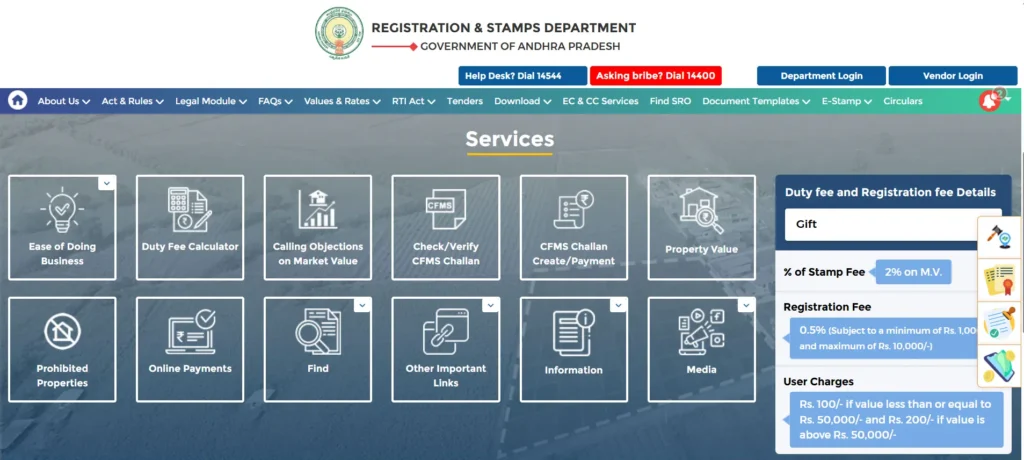
Key IGRS AP Services for Property Transactions
The IGRS AP portal offers several core services that are essential for anyone involved in a property transaction. Each service plays a unique and critical role in due diligence, financial planning, and legal compliance. The following sections provide detailed guides on how to access the most important services for property buyers, sellers, and legal professionals.
- Encumbrance Certificate (EC) search and download
- Market value verification for properties
- Prohibited properties list access
- Certified Copy (CC) downloads
- Stamp duty calculation tools
- Property registration status tracking
IGRS AP EC Search and Download
An Encumbrance Certificate (EC) is a vital legal document that confirms a property is free from any financial or legal liabilities, such as unpaid loans, mortgages, or ongoing disputes. Obtaining a Nil Encumbrance Certificate (Form 16) is often a prerequisite for key property-related actions, as it serves as proof that the property is legally clear. Conversely, if the property has a pending claim, it will be listed in a Form 15 EC.
The EC is a key document required when buying or selling a property, applying for a home loan, or even when withdrawing funds for land purchase from your Provident Fund (PF). The online IGRS AP EC search feature has digitized this process, making it significantly faster and more convenient than traditional offline methods.
Here is a step-by-step guide on how to search and download the IGRS AP EC online:
- Visit the Official Portal: Navigate to the official IGRS AP website at
https://registration.ap.gov.in. - Access EC Services: On the homepage, locate and click on the “EC, CC & MV Assistance” option.
- Choose Certificate Type: You will be prompted to select either “EC For Information Only” or “Signed EC.” Note that for a digitally signed EC, you will need to log in to your account with the appropriate credentials.
- Enter Property Details: The system will redirect you to the EC search page. Here, you must provide specific details to identify the property, including the Encumbrance Type, the Document Number, the Year of Registration, and the Sub-Registrar Office (SRO) where the property was registered.
- Submit Your Request: Complete the captcha verification and click the “Submit” button.
- Download or Print: The portal will fetch the certificate details. Follow the on-screen instructions to download or print the EC for your records.
Checking IGRS AP Market Value
The IGRS AP market value tool provides the official government-determined price of land or property in any given area of Andhra Pradesh. This value is also known as the “circle rate” or “guideline value” and is a critical figure for calculating stamp duty and registration fees, which are based on this official rate.
The market value is revised periodically by the Andhra Pradesh Registration & Stamps Department to align with prevailing market conditions. For instance, non-agricultural land values in urban areas are revised annually, while values for agricultural land in rural areas are updated every two years. Regularly checking this value is not only essential for financial planning but also helps in preventing black money transactions and ensuring state revenue is accurately collected.
Here is how you can check the IGRS AP market value online:
- Access the IGRS Portal: Go to the IGRS AP official website
https://registration.ap.gov.in. - Navigate to Market Value: Look for the “Market Value” section, typically located under the “Services” tab.
- Provide Location Details: On the subsequent page, you will be required to select the property’s location by choosing the district, mandal, and village from the dropdown menus.
- Enter Property Information: Enter the specific property details, such as the survey number and locality, to refine your search.
- Retrieve Details: Click on “Get Details” or a similar button to view the current guideline value for the selected area.
Verifying the IGRS AP Prohibited Properties List
A prohibited property in Andhra Pradesh is a parcel of land that cannot be legally sold, transferred, or registered without prior approval from the government or a relevant authority. This restriction is put in place to protect various types of lands, including those owned by government departments, parcels involved in ongoing legal disputes, or lands designated for environmental or religious purposes. Verifying a property’s status against this list is a non-negotiable step in the due diligence process.
The Prohibited Properties list is essential for several reasons:
- Legal Due Diligence: It helps prospective buyers and developers confirm that a property is legally sellable before they invest.
- Bank Loan Eligibility: Financial institutions, including banks, will reject a home loan application if the property is flagged as prohibited land.
- Preventing Illegal Transactions: This list serves as a safeguard to prevent unauthorized sales and ownership transfers, protecting the interests of both the government and the public.
Here is how you can check the IGRS AP prohibited properties list online:
- Access the Portal: Visit the IGRS AP official portal
https://registration.ap.gov.in. - Find the Prohibited Properties Section: Navigate to the “Prohibited Properties” section, which is a key feature of the portal.
- Input Property Details: Enter the required information, such as the district, mandal, village, and either the survey number (for rural areas) or door number (for urban areas), to check its status.
- View Status: Submit the details to determine if the property is on the restricted list.
IGRS AP Certified Copy (CC) and Other Services
In addition to the core services mentioned above, the IGRS AP portal offers a variety of other useful features to assist with property management. One of the most important is the ability to view and download a Certified Copy (CC) of a registered document, such as a sale deed. The portal also provides a list of transactions to help you check registration details based on the document number or other property information. For financial planning, the online Duty Fee Calculator helps users estimate the correct stamp duty and registration fees for their transaction. The portal also includes a grievance redressal system, allowing users to submit and track complaints related to property matters.
Essential Documents, FAQs, and Best Practices
To ensure a smooth property transaction process, it is essential to have all required documents in order and to understand the key legal distinctions. The IGRS AP portal provides a convenient way to access and verify many of these documents.
Essential Documents for Property Registration
While the exact list may vary, most property registrations require the following documents:
- Identity Proof: Aadhaar Card, PAN Card, or passport for all parties involved.
- Address Proof: An electricity bill, ration card, or voter ID.
- Property Documents: The sale agreement, previous title deed, or gift/partition deed.
- Encumbrance Certificate (EC): A recent EC covering at least the last 13 to 30 years to confirm there are no liens on the property.
- Latest Property Tax Receipt: The most recent tax payment receipt from the local municipality.
EC vs. Sale Deed vs. Patta: A Clear Distinction
The three documents below are often confused, but each serves a distinct legal purpose in a property transaction.
| Document Name | Primary Purpose | Issued By |
| Encumbrance Certificate (EC) | Confirms a property is free from legal/financial issues (liens, loans). | IGRS / Sub-Registrar’s Office |
| Sale Deed | Serves as the final legal document that proves property ownership has been transferred from a seller to a buyer. | Sub-Registrar’s Office |
| Patta | An official land ownership record, generally used for agricultural or rural properties. | Revenue Department |
Frequently Asked Questions
What if the EC shows incorrect details?
If you find any incorrect information in your Encumbrance Certificate, you should visit the concerned Sub-Registrar’s Office and request a correction with supporting documents.
Is an EC used as proof of ownership?
No, an Encumbrance Certificate only reflects the legal and financial transactions related to a property over a specific period. It does not confirm ownership. Ownership is typically proven with documents like a Sale Deed, Title Deed, or Patta.
Is it compulsory to register an EC?
No, the registration of an Encumbrance Certificate is not required. The EC is a report or record of transactions, not a legal document that needs to be registered.
What should I do if my land is marked as prohibited?
If your property is on the prohibited properties list, you cannot legally sell or register it without special approval. You should collect all your land documents and consult with an experienced lawyer to challenge the status with the appropriate authority.